Why Build This?
I have tried to track my spending many times. Spreadsheets, money apps, notes on my phone. The pattern was always the same. Week one, I was careful. Week two, I started to miss some. Week three, I forgot about it completely. The problem was not the app. The problem was that I had to remember to write down every coffee I bought.
Then I noticed something. My bank already keeps a record for me. Every time I pay with QRIS (Indonesia’s QR code payment), make a transfer, or top up an e-wallet, BNI and BSI send me a notification email. The data is already in Gmail. I just need to read it.
But there is a catch: the bank only sends emails for money going out. When my salary comes in, or a friend sends me money, there is no email. So an app that only reads emails will always get the balance wrong. Almost every design choice in this project comes from these two facts.
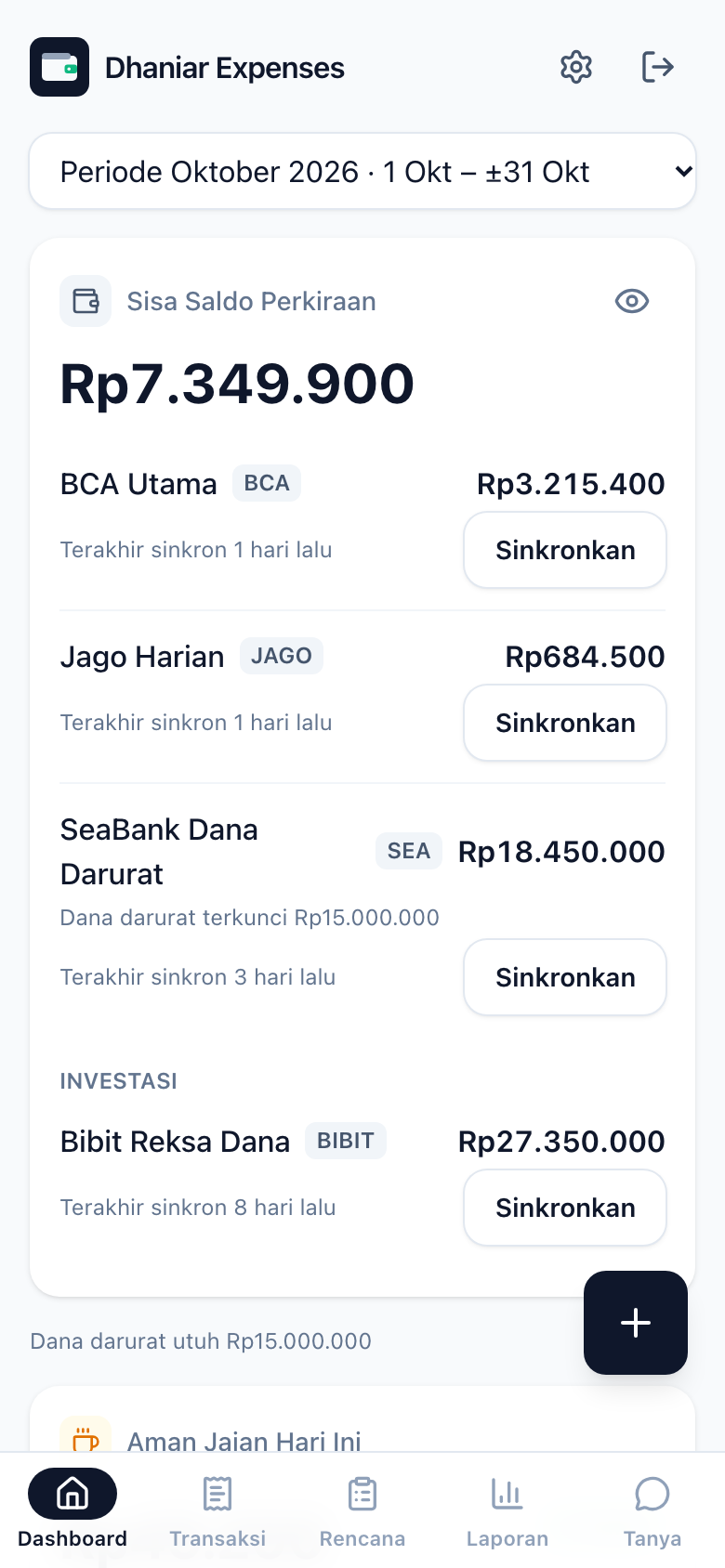
My goal was also more than just “know where my money goes”. I have a monthly plan (fixed bills, a food budget, savings). What I need is a daily answer to one question: how much can I still safely spend today?
It Started With Documents, Not Code
The first commit in this repo was not code. (A commit is one saved change in git, the tool that tracks code history.) It was two documents: a PRD (product requirements document, a plan of what the app should do) and CLAUDE.md, written at 3 a.m. I wrote most of the code in this project together with an AI agent (Claude Code). I learned that the agent works much better when the rules are written down clearly: which architecture is final, which layer can import what, no any type, a maximum of 200 lines per file, and so on.
After that, the work went roughly like this:
- Phases 1–3: database schema + RLS in Supabase, the email parser, and then the base React app with Google login and a form for adding transactions by hand. (Supabase is a hosted database service. RLS, or Row Level Security, is a database rule that makes sure each user can only see their own rows. A parser is code that reads text and pulls out the data you need.)
- Phases 4–10: dashboard, budgets, bill checklist, PWA, push notifications, reports, savings progress. (A PWA, or Progressive Web App, is a website you can install on your phone like a normal app.) Yes, all of this was done on the same day. With a clean PRD and strict quality gates, the agent could move fast without making a mess.
- Phases 11–14: the AI assistant. First it could read data, then write data with confirmation, and finally read photos of receipts.
- The next two weeks: the part that never shows up in a demo. Handling busy AI models, late bank emails, and a parser that quietly stopped working.
One interesting turning point is in ROADMAP.md. Drafts 1 and 2 planned an MCP server so I could ask questions about my data through Claude. (MCP is a standard way to connect AI tools to outside data.) In Draft 3 the direction changed completely: the assistant would live inside the app and use a free model, because I wanted to ask questions straight from my phone without opening another app. MCP was not thrown away. It just moved to a later phase.
How Long Did It Take?
The total work time was less than one working day. I counted the numbers from the commit timestamps in git, not from memory:
- PRD to MVP (Phases 1–10): about 5 hours. The first code commit went in around midday, and by the afternoon the dashboard, budgets, checklist, PWA, push notifications, and reports were all working. (MVP means “minimum viable product”, the first version that is actually usable.)
- AI assistant that reads + writes with confirmation (Phases 11–13): about 2.5 hours, done in the early morning of the next day.
- Total active hours: about 7–8 hours for 87 commits. Here, active hours only count the gaps between commits that are shorter than one hour. The rest was spread over a dozen or so short sessions across two and a half weeks, for fixes and extra features.
This does not mean the AI did everything alone. My role changed. I spent more time writing specs, making architecture decisions, reviewing diffs (the list of code changes), and testing on my phone, and much less time typing code. The key was preparation: a detailed PRD, rules in CLAUDE.md, and quality gates that reject bad code automatically. Without these three things, the agent’s speed turns into a source of problems. With all three, one person can deliver a full-stack app with a parser, a backend, a PWA, and an AI assistant in a matter of hours.
Problem 1: Parsing Bank Emails in Google Apps Script
The parser runs in Google Apps Script (GAS), Google’s tool for running small scripts on their servers, with a timer that triggers it every 5 minutes. I did not want to write plain JavaScript in the GAS web editor. So I wrote the parser in TypeScript, bundled it with esbuild into one IIFE file (a single self-running JavaScript file), and pushed it with clasp.
The key was to keep the pure core logic separate from a thin layer that talks to Gmail and Supabase. The HTML email is turned into a list of text lines. Then each email type is described as a label spec, not as one giant regex:
// "This field is on the line after label X"
const SPECS = {
  qris:     { kind: 'qris', party: 'Penerima', amount: 'Nominal', fees: ['Biaya admin'] },
  transfer: { kind: 'transfer', party: 'Penerima', amount: 'Nominal', fees: ['Biaya admin'] },
  topup:    { kind: 'topup', party: 'Penerima', amount: 'Nominal', fees: ['Biaya transaksi'] },
};

export function valueAfter(lines: string[], label: string, offset = 1) {
  const i = lines.findIndex((line) => line.toLowerCase() === label.toLowerCase());
  return i === -1 ? null : (lines[i + offset] ?? null);
}
(The labels are the Indonesian words used in the bank emails: “Penerima” means recipient, “Nominal” means amount, “Biaya admin” means admin fee, and “Biaya transaksi” means transaction fee.)
To add a new email type, I only need to add one spec, one real email sample with personal data hidden, and one test. Some small details turned out to matter:
- Admin fees are saved as a separate row with a
message_idthat ends in:fee. This way a transfer of Rp X is not saved as one expense of “Rp X + admin fee”. - The parser checks the total itself. If
Nominal + Biaya(amount + fee) is not equal toTotalin the email, the parse counts as failed. It is better to fail loudly than to be wrong quietly. - Emails that fail to parse are not thrown away. They get a Gmail label
failedso I can check them.
Then there was the trickiest bug. One night a QRIS payment was not recorded, and there was no error at all. It turned out the email’s Date header said 22:22, but the email only arrived in Gmail at 23:27. The parser filtered emails by Date with a 1-hour overlap window, so that email was simply skipped. The fix was boring but it works: I made the re-read window 6 hours wide, and the database handles duplicates through a unique message_id.
After that I added a heartbeat. Every time the parser runs, it writes its status to a parser_status table. A cron job (a task that runs on a schedule) checks every hour and sends a push notification if the parser last ran more than 30 minutes ago. A parser that throws errors is annoying. A parser that goes silent is much more dangerous.
Problem 2: Honest Time and Honest Balances
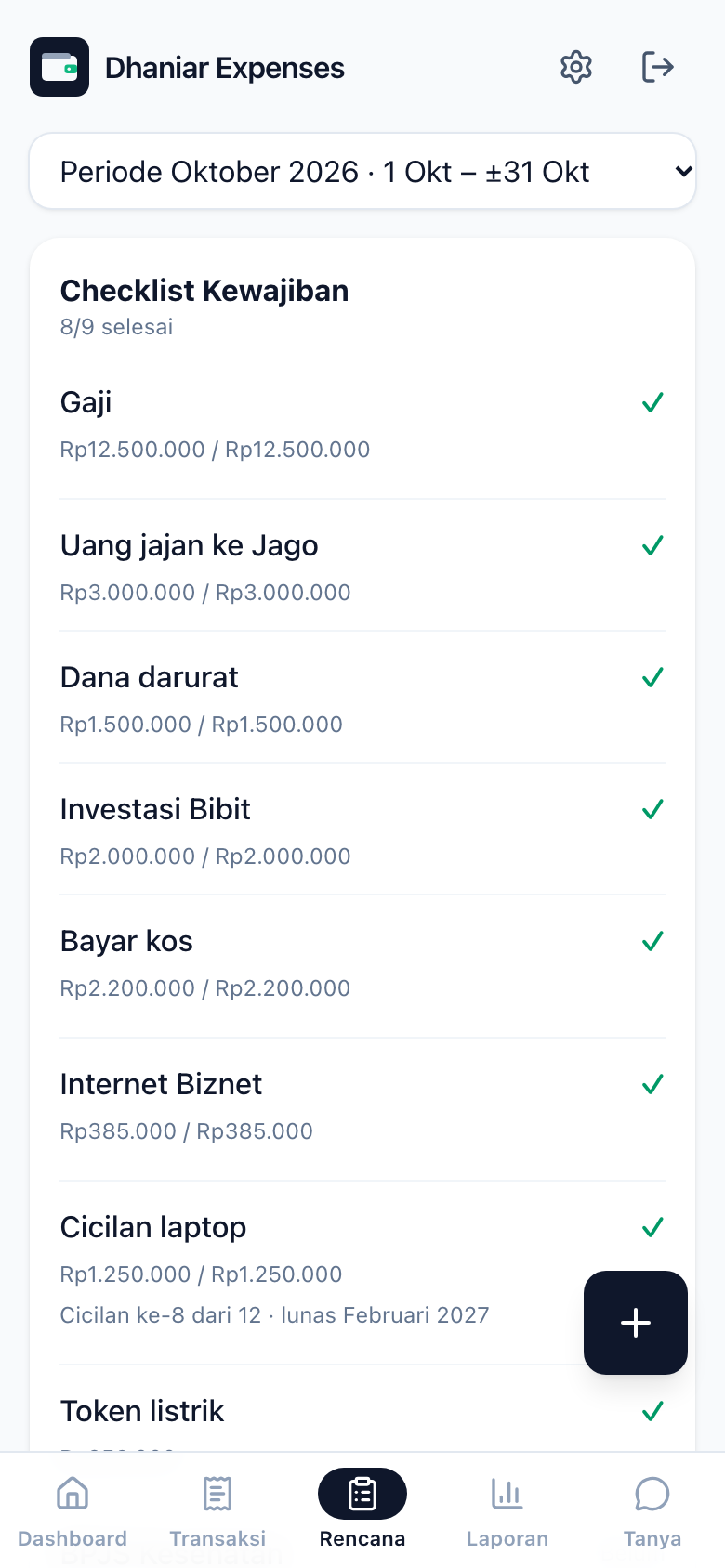
Pay periods, not calendar months. My salary does not come on the 1st. So an “October” budget counted from October 1 to 31 means nothing. All budgets, checklists, and reports use the pay period: from the day my salary arrives until the day before the next salary. A SQL function, pay_periods(), works out these periods from the salary transactions already in the database. The current period is marked as an estimate. If my salary is late, the end of the period moves forward up to today.
Balance = latest snapshot + transactions after it. Because money coming in has no email, the calculated balance will always drift. Instead of pretending to be accurate, I accepted that the balance needs correcting sometimes. The Sinkronkan Saldo (Sync Balance) button does not change the “starting balance”. It adds a new snapshot. The get_balances function takes the latest snapshot and then adds up the transactions after it:
select a.id,
  coalesce(s.balance, 0) + coalesce(sum(
    case when t.account_id = a.id and t.type = 'income' then t.amount
         when t.account_id = a.id then -t.amount   -- expense / transfer out
         else t.amount                             -- transfer in
    end), 0)
from accounts a
left join lateral (
  select balance, as_of from balance_snapshots
  where account_id = a.id order by as_of desc limit 1
) s on true
left join transactions t
  on (t.account_id = a.id or t.to_account_id = a.id)
 and (s.as_of is null or t.occurred_at > s.as_of)
group by a.id, s.balance;
History is never rewritten, the difference from a sync is not counted as a transaction, and the function is security invoker, so RLS still applies.
Another lesson came from the data, not the code. My first plan assumed I paid for food in cash. Once the data from the first nine days of that month came in, it was clear that almost all my food and coffee was paid with QRIS, and cash was only for fuel. I changed the plan the same day. It turns out a tracking app is most useful when it proves your plan is wrong.
Problem 3: An AI Assistant That Can Only Suggest
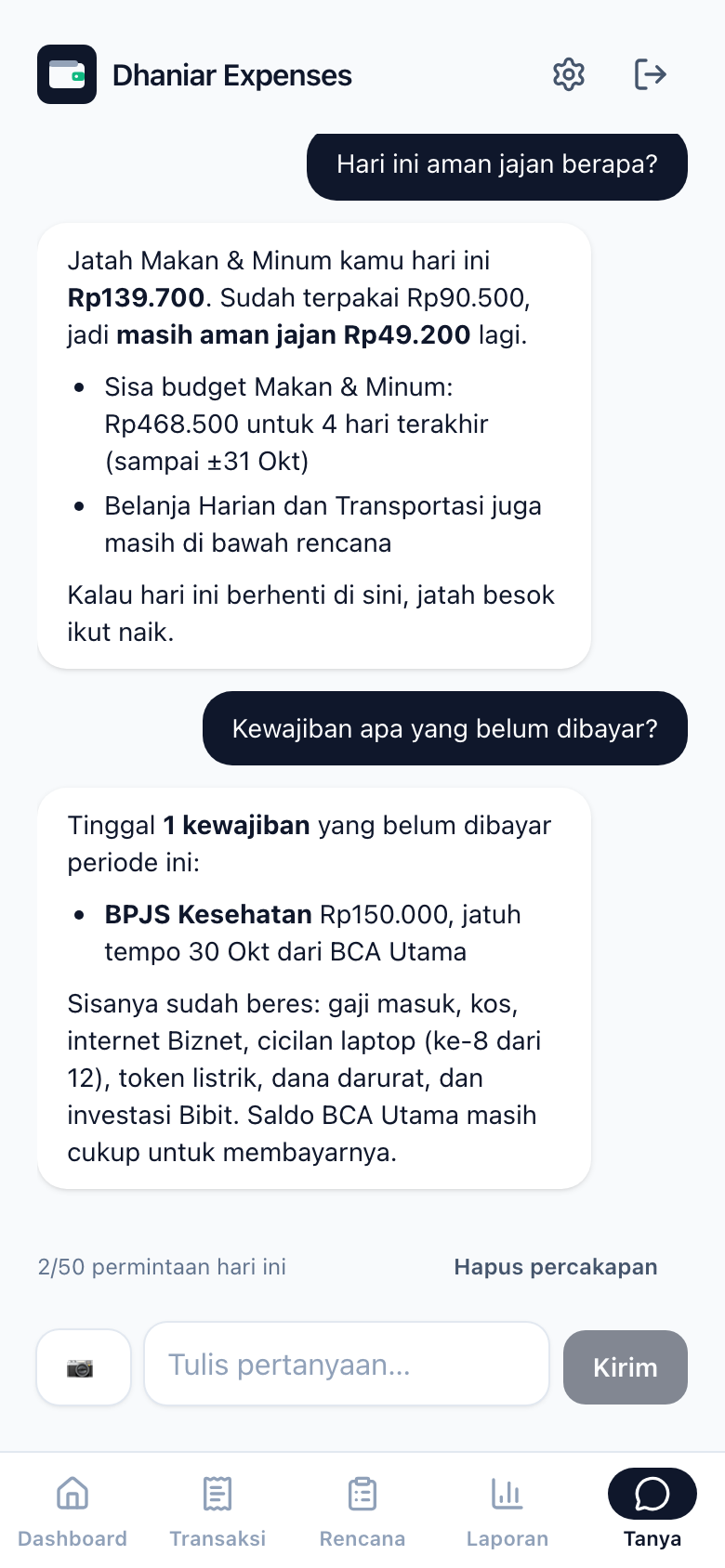
The assistant in the Tanya (Ask) tab can answer “how much is left in my food budget?” and can also record things like “add a bonus that came into BSI yesterday”. The second one is scary. A language model (LLM) can misunderstand. Text from a bank email or a receipt could also contain hidden instructions that sneak in (this is called prompt injection).
So the rule is strict: the model never writes data. Every write tool has a summarize function. Inside the chat loop, write tools are not run. They are only turned into suggestion cards:
async function runToolCall(call, deps, { env, proposals }) {
  const tool = deps.tools.find((t) => t.name === call.function.name);
  const input = JSON.parse(call.function.arguments);
  if (!tool.summarize) return JSON.stringify(await tool.run(input, env)); // read tool

  const draft = await tool.summarize(input, env);          // validation + card text
  proposals.push({ id: deps.uuid(), tool: tool.name, input, ...draft });
  return JSON.stringify({ status: 'menunggu konfirmasi pengguna', summary: draft.summary }); // "waiting for user confirmation"
}
Data is only written through a separate route, /ai/confirm, when I press Konfirmasi (Confirm). This route is idempotent per suggestion id, which means pressing it twice for the same suggestion should only run it once (it checks assistant_audit_log first). It also validates the input again, records every action in the audit log, and uses no LLM quota at all. Delete or overwrite actions show up as a red “Ya, lanjutkan” (Yes, continue) card.
One more thing: the Edge Function does not use the service role (the admin key that skips all security rules). (An Edge Function is a small piece of server code that runs on Supabase.) The Supabase client is created per request with the publishable key + the user’s own JWT (login token), so every query is still limited by RLS. Even if the model “manages” to call a strange tool, it can only see data that I am allowed to see anyway.
The number logic is not left to the model either. Balances, remaining budgets, and simulations are all calculated by pure functions in src/domain, the same functions the UI uses. The model only explains. So the numbers in the chat are always the same as the numbers on the dashboard.
Problem 4: Living on the Free Tier
I chose free models on purpose, and the free tier is full of surprises:
- Gemini 3 “thinks” for a long time by default, so one round of tool calls could go past the 40-second timeout. The fix was
reasoning_effort: low. - Gemini often replies with a 503 “high demand” error for a few seconds. For vision (reading receipts), the model is retried once before switching to a backup.
- Gemini 3 tool calls include a
thought_signaturethat must be sent back exactly as it was. My Zod schema at first removed unknown fields, and the conversation broke right away on the second round. - The main chat moved to Groq, which is fast, but its limit is 8K tokens per minute. In the end I cut the tool descriptions down to just their first sentence, only for Groq.
All providers are called through an OpenAI-compatible API format, so the fallback is just a list of configs tried in order. A model that hits a rate limit (too many requests) is “rested” until its retry-after time passes. This way the next call does not waste time on a model that will surely say no:
function withFallback(chain: LlmConfig[]) {
  const resting = new Map<string, number>();
  const isResting = (c) => (resting.get(c.model) ?? 0) > Date.now() && c !== chain.at(-1);
  return async (call) => {
    let failure;
    for (const config of chain.filter((c) => !isResting(c))) {
      try { return await call(config); }
      catch (error) {
        const until = cooldownUntil(error, Date.now()); // 429/413 → now + retry-after
        if (until) resting.set(config.model, until);
        failure = error;
      }
    }
    throw failure;
  };
}
The last model in the chain is always tried, so there is at least one chance to answer. The same care goes into receipt reading. The JSON output from the vision model is never trusted as-is. There is a forgiving normalizer that accepts "59.800", 59800.0, discount lines with negative values, or times with seconds. It only gives up if the merchant or the total really cannot be read.
Quality Gates as a Fence for the Agent
When code is written this fast, the fence has to be high. npm run check must pass before any work counts as done, and it also runs in CI (automatic checks on every change) before merging:
- typecheck for three separate tsconfigs (app, GAS, service worker), because each one has different globals;
- ESLint with
--max-warnings 0, including rules on which layer can import from which (domain/cannot importai/, and so on); - jscpd (a copy-paste detector) with a threshold of 0, because AI agents like to copy logic that already exists in another file;
- Vitest for the domain, parser, and components, plus pgTAP for the SQL functions and RLS.
The newest one is a tool-routing eval (a test that scores the AI model’s answers). It has 37 questions in Indonesian. Each one makes one real call to the model, and then it checks whether the first tool the model picked is correct. For example, “cicilan bulan lalu udah lunas?” (“is last month’s installment paid off?”) must call get_checklist with period: 'previous'. Unit tests cannot catch it when the model starts picking the wrong tool after a prompt change. An eval can.
What I Would Do Differently
- Monitor the parser from day one. I only added the heartbeat after a transaction went missing without any warning. For a system that runs in the background, “is it still alive?” should be the first feature, not a patch.
- Run evals before calling an AI feature done. The goal for Phase 12 was actually “eval ≥ 90%”. But what really happened is I tried a few questions by hand and moved on to the next phase. The eval was only ready two weeks later.
- Make idempotency truly atomic. Right now
/ai/confirmdoes check-then-write. A double tap that gets past the disabled button could run an action twice before the audit row is saved. I have already marked this in the code. The right fix: claim the key in the audit log first, or put the tool and the audit into one SQL transaction. - Be data-driven from the start. My money plan was first stored in a SQL seed file and in the prompt text, including the bank names. Once I wanted other people to be able to use the app, I had to spend a whole phase moving it into a settings table.
This project taught me that the most interesting part of a personal app is not its features. It is its honesty: a balance that admits it needs correcting, a parser that would rather fail than be wrong, and an AI that knows to ask first before it touches any data.
You can see an overview of the features and architecture on the Dhaniar Expenses project page.