[featured]
Dhaniar Expenses
A personal finance PWA that records bank transactions automatically from notification emails, keeps a budget for each salary period, and has an AI assistant that always asks for confirmation before it writes any data.
Technologies
Project Overview
Dhaniar Expenses is a personal finance app for one user (me). The problem was simple: every time I tracked my spending by hand, I stopped after a few weeks. But my banks already send an email for every payment that goes out (QRIS, transfers, e-wallet top-ups, virtual accounts). So this app reads the notification emails from BNI and BSI, turns them into transactions, and then calculates how much money is really safe to spend.
Goals
- Record transactions automatically from bank emails, including admin fees and transfers between my own accounts
- Show the spendable balance: the bank balance minus the emergency fund, which is locked
- Calculate the budget, the bills checklist, and reports per salary period, not per calendar month
- Send reminders with push notifications when money moves, when a budget is running low, or when a bill is late
- Provide an AI assistant to ask questions and record data, but it never writes data without my approval
Key Features
The app’s UI is in Indonesian, so the page names below are kept as they are in the app.
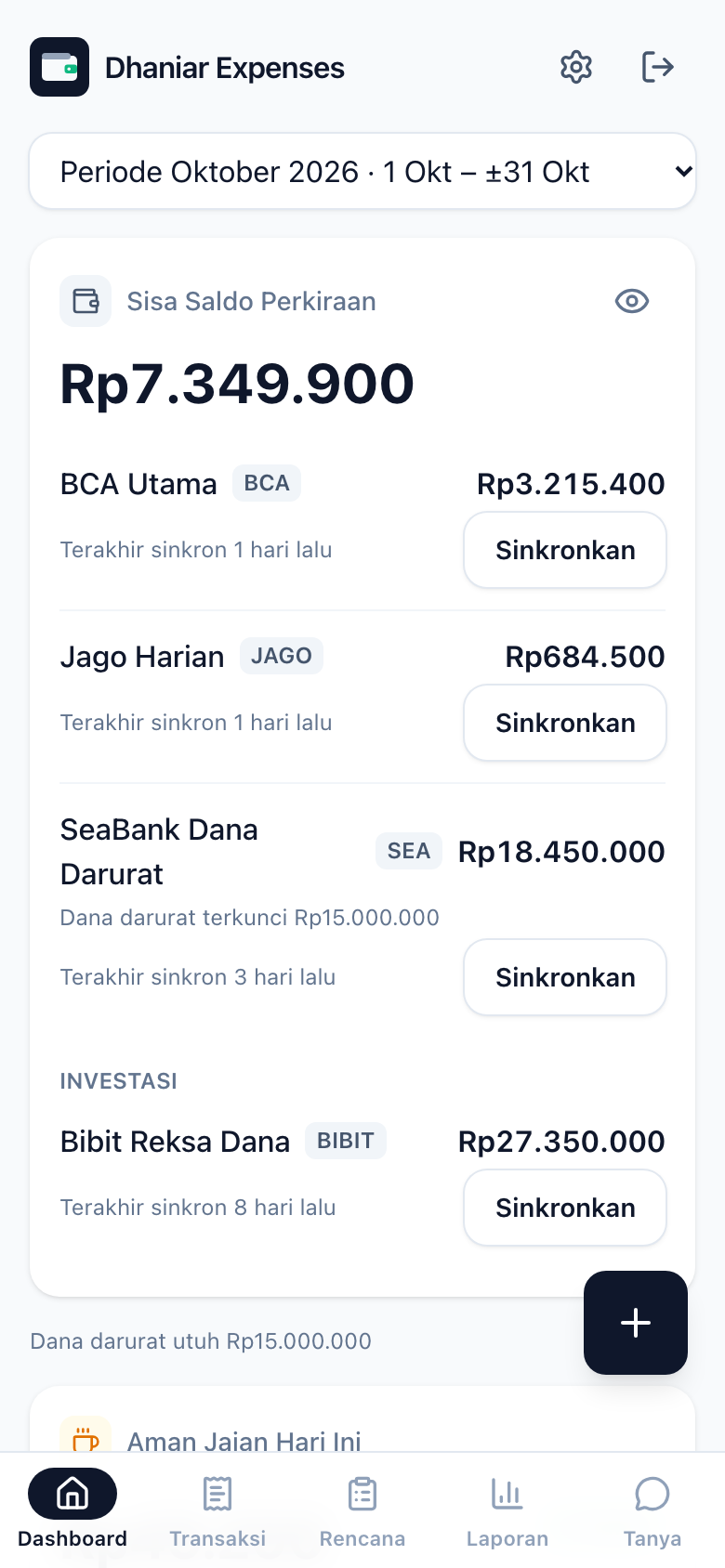
- Dashboard: Sisa Saldo Perkiraan (estimated remaining balance), the balance of each account with a Sinkronkan Saldo (Sync Balance) button, an emergency fund guard, an Aman Jajan Hari Ini (Safe to Spend Today) card, and the savings rate. The card takes the remaining budget and divides it by the days left, and shows a status: safe, careful, or danger. Balances are hidden by default.
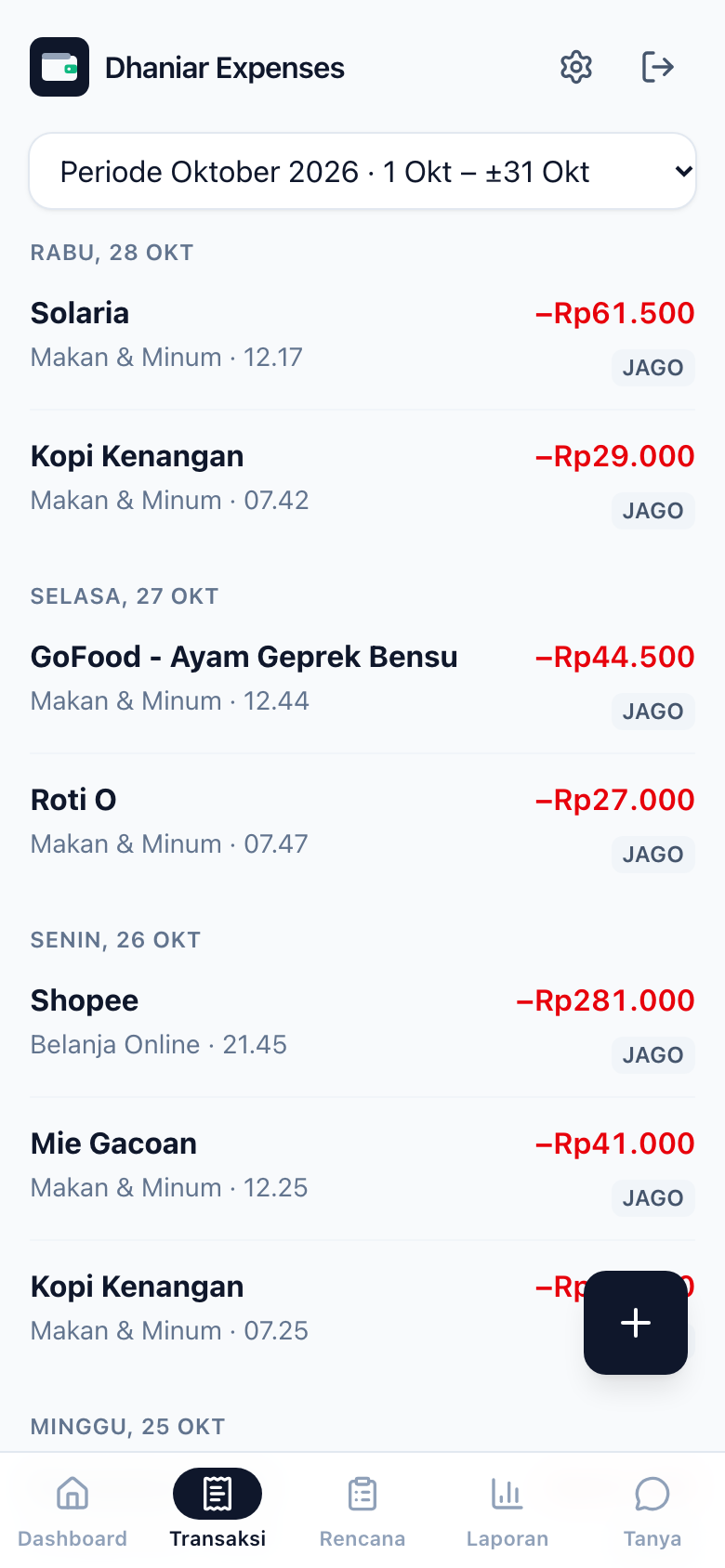
- Transaksi (Transactions): money movements grouped by day, changing categories, and editing or deleting manual transactions.
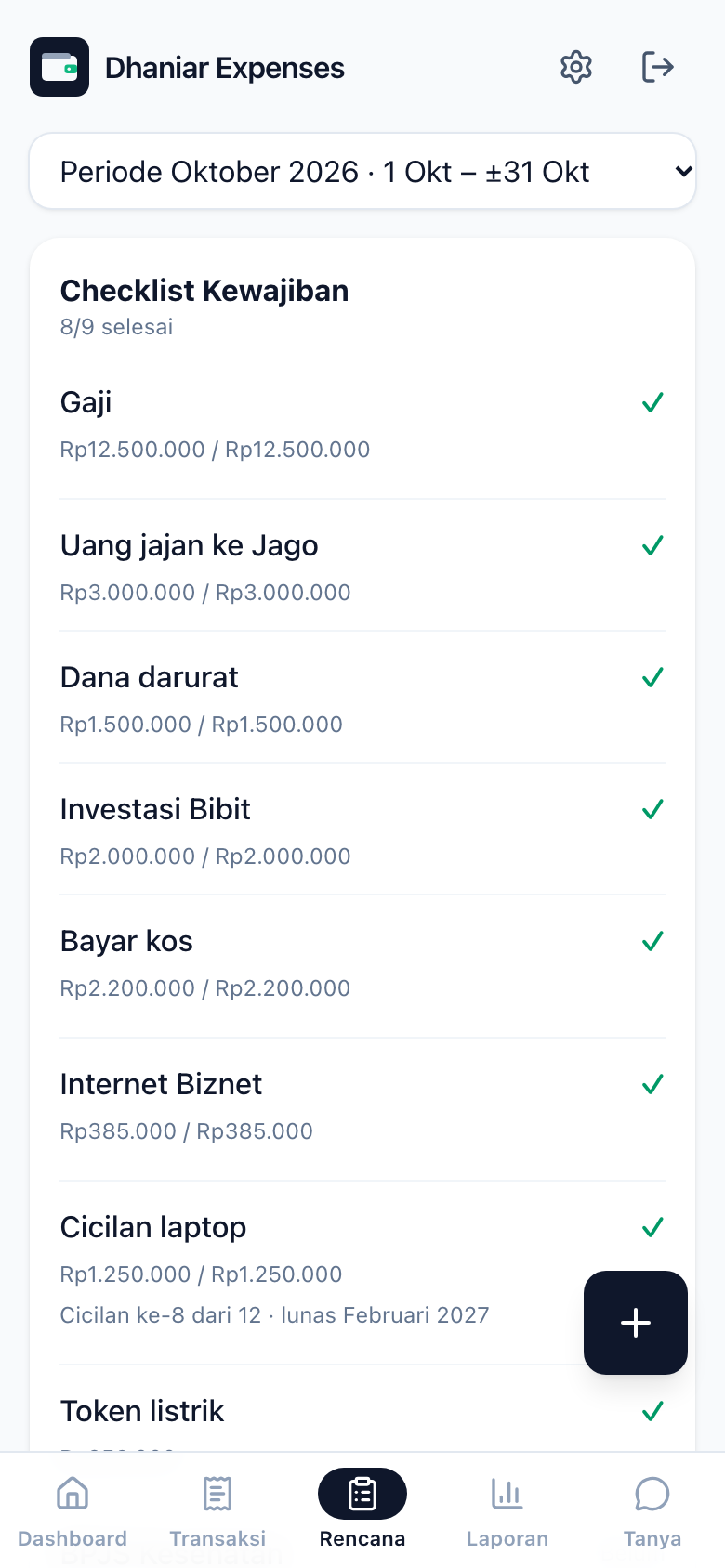
- Rencana (Plan): a checklist of bills that is matched with transactions automatically, installments, Plan vs Actual for each budget, spending outside the plan, unrecorded differences, and savings progress.
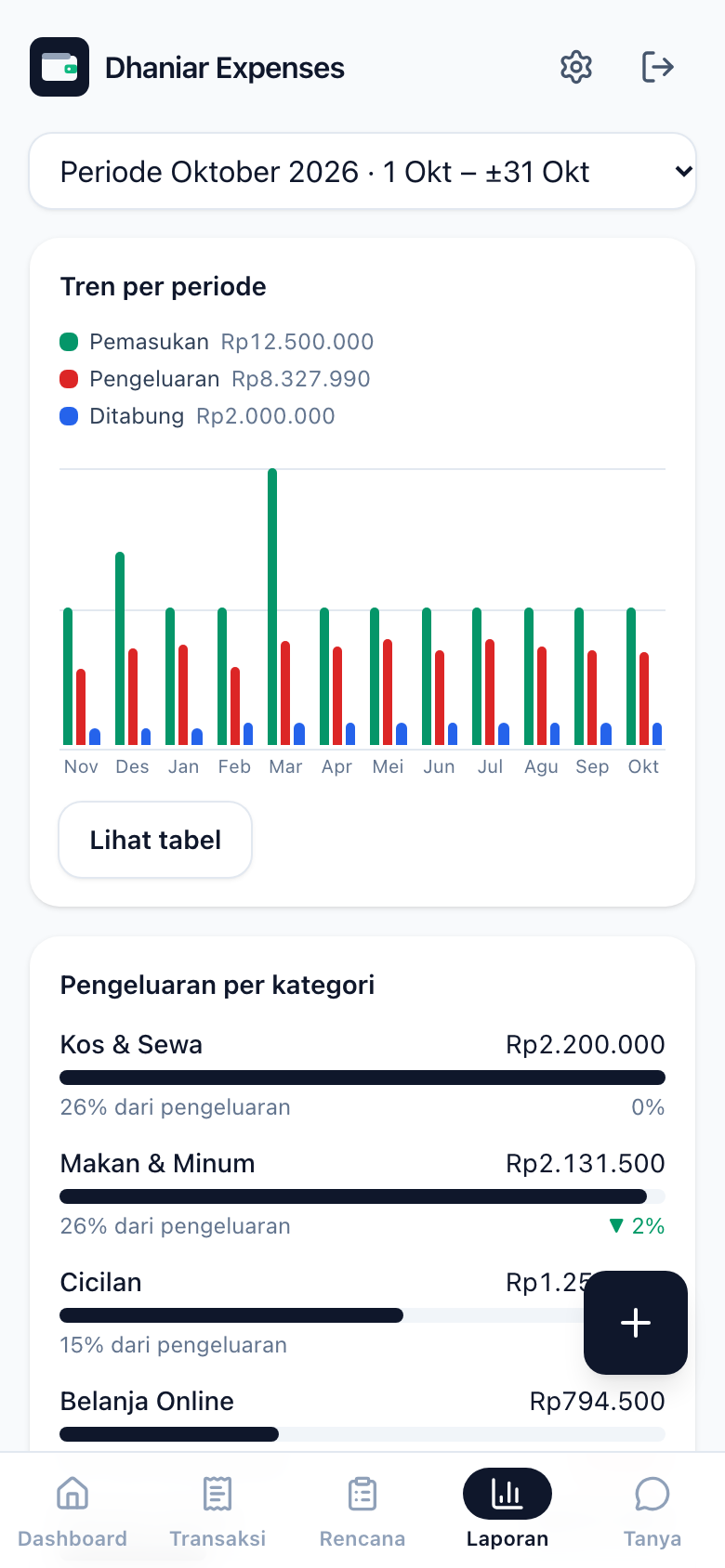
- Laporan (Reports): a trend over 12 periods (income, spending, saved), a category breakdown compared with the previous period, and the top merchants.
- Tanya (Ask): a chat with the AI assistant in Indonesian. It can answer questions about balances, budgets, and reports. It can suggest actions (record, change, or delete transactions, and set budgets, checklist items, accounts, and categories). It can also read receipt photos, check my financial health, and run “what if” simulations.
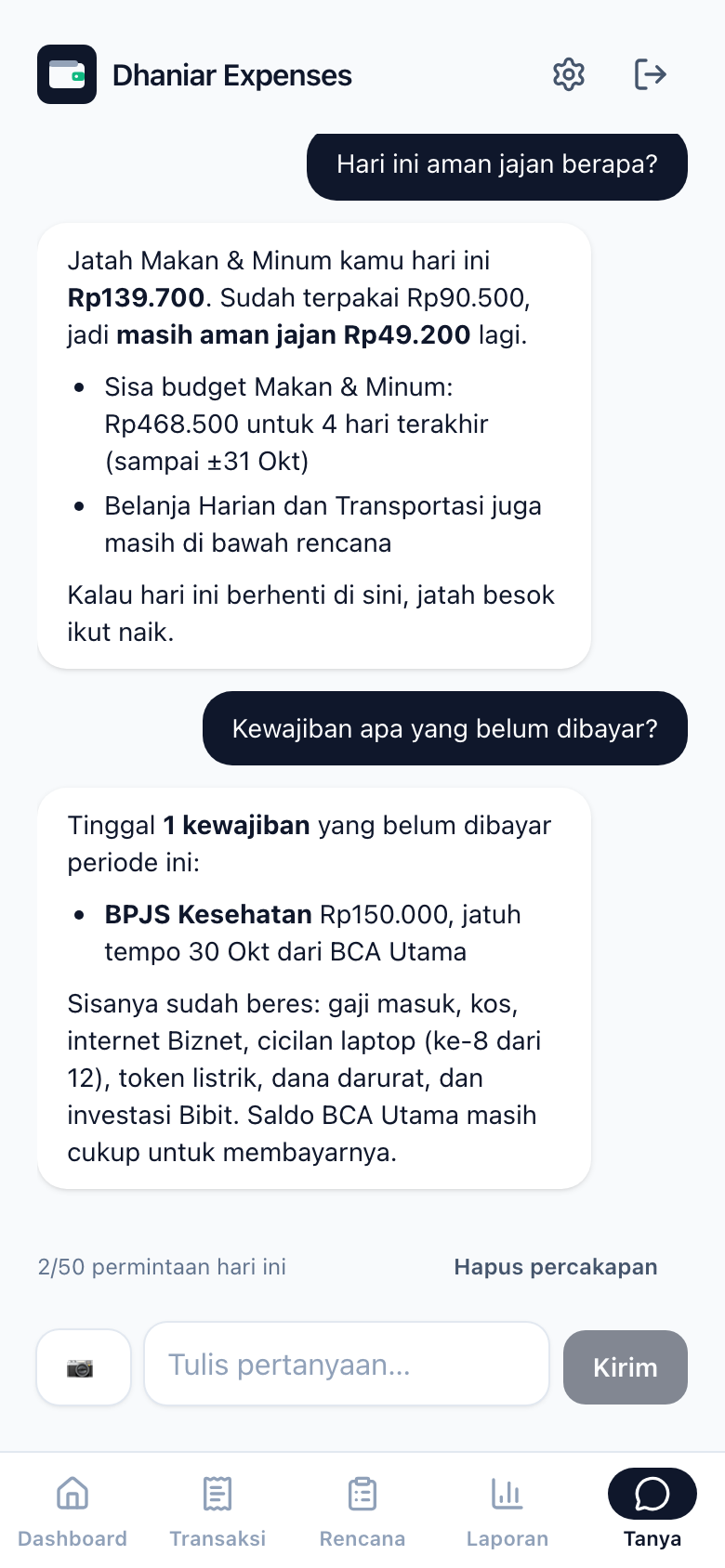
The app is a PWA (Progressive Web App: a website that you can install on your phone like a normal app). It works on Android and iOS, uses Google login, and has 11 types of notifications that can be set for each device.
Architecture
Gmail (bank emails)
   │ trigger every 5 minutes
   ▼
Google Apps Script (TypeScript → esbuild)
   │ parse email → transaction + admin fee
   ▼
Supabase ─ Postgres + RLS, Google Auth
   ├─ insert trigger & pg_cron ──► Edge Function `notify` ──► Web Push ──► phone
   └─ Edge Function `ai` (/chat, /confirm, /receipt) ──► LLM (OpenAI-compatible API)
   ▲
React PWA (Cloudflare Workers)
Technology Stack
- React 19 + Vite + strict TypeScript: the frontend, with React Compiler, React Router, and React Hook Form + Zod
- TanStack Query: the only path for data from the UI to Supabase
- Supabase: Postgres with RLS (Row Level Security: database rules that decide which rows each user can see) on every table, Edge Functions (small server functions running on Deno), pg_cron (scheduled jobs inside the database), pg_net, and Vault for secrets
- Google Apps Script: the email parser (the code that reads an email and pulls out the data), written in TypeScript, bundled with esbuild, and deployed with clasp
- Workbox + Web Push (VAPID): a service worker for the app shell and notifications
- Vitest, Testing Library, pgTAP: tests for the domain logic, components, Edge Functions, and the database
Interesting Technical Decisions
Pure business logic in one place
All the rules (balance, periods, budget, checklist, notifications, reports) live in src/domain/ as pure functions with tests. A pure function only takes input and returns output, with no database or network calls. The frontend, the notify Edge Function, and the AI assistant’s tools all use the same modules through esbuild bundling, so no logic is copied between runtimes. The email parser follows the same pattern: the parsing core is pure and tested with anonymized email fixtures, and the Gmail and Supabase layers are kept as thin as possible. The import direction is enforced with ESLint no-restricted-imports.
Balance = last snapshot + transactions after it
There is no “starting balance” that gets edited. The SQL function get_balances takes the last balance snapshot for each account and adds the transactions after it. When the balance in the app is different from the real balance, the Sync button just adds a new snapshot, and the history stays complete.
Salary period as the unit of time
One period starts on the day my salary arrives and ends the day before the next salary. Budget, checklist, reports, and notifications are all calculated per period, because that is how the money is really used.
Layered dedup
Dedup means making sure the same transaction is not recorded twice. The parser reads the last 6 hours of email again each time (the bank’s gateway is sometimes more than an hour late) and relies on the Gmail message_id, which is unique in the database. Admin fees get their own derived key. Notifications are deduped with notification_log, and the key is released again if the push fails to send. The assistant also checks for similar transactions within ±10 minutes before it suggests a new record.
AI suggests, the user confirms
The model can only suggest. Every write tool creates a Konfirmasi (Confirm) card, and delete or overwrite actions use a red card. The action only runs through /ai/confirm after I press the button. It is idempotent per suggestion id (pressing twice does not run it twice), it is saved in an audit log, and it does not use LLM quota. All queries run with the user’s JWT (so RLS applies), not with the service role.
Strict quality gate
npm run check runs tsc, ESLint (--max-warnings 0, sonarjs, cognitive complexity ≤ 10), jscpd with a duplication threshold of 0, and Vitest. CI on GitHub runs check and pgTAP on a fresh database, and main can only be changed through a PR that passes both jobs.
Challenges & Solutions
- Free LLM quota is not stable: the chat uses a fallback chain. Groq is the main model, DeepSeek is optional, and then there are several Gemini models. A model that hits a limit (429/413) is skipped until its
retry-aftertime is over. For the Groq free tier, the tool descriptions are shortened so they fit within the tokens-per-minute limit. There is also my own daily call limit. - Receipt photos without storage: the photo is compressed in the browser (JPEG ≤ 1280px), sent directly to a vision model with structured output, and then thrown away. Only the extracted result is saved. Notes like “split by 4” are used to calculate my share.
- Gemini 3 and tool calls: the response includes a
thought_signaturethat must be sent back exactly as it is, so the response schema is loose in that part. - The parser stops without any warning: the parser writes a heartbeat to a status table. pg_cron checks it every hour and sends a push if the parser is stuck or if an email failed to parse.
- Measuring the assistant’s quality:
npm run eval:aiasks about 37 questions in Indonesian and checks whether the model chooses the right tool and arguments.
Results & Lessons
Now almost all my spending is recorded without me typing anything, and I can see how much I have left for the day before I buy something. The biggest lesson: keeping pure logic separate from I/O means one rule can be used in the browser, in the notification Edge Function, and in the AI assistant’s tools at the same time, and it stays easy to test. Limiting the AI to suggest + confirm also proved to be much safer and easier to trust than letting it write data by itself.
Development Time
I built this project together with an AI agent (Claude Code) in less than one working day, based on the commit timestamps:
- MVP (Phases 1–10): about 5 hours, from the PRD to a working dashboard, budget, checklist, PWA, push notifications, and reports
- AI assistant with the confirmation flow (Phases 11–13): about 2.5 hours
- Total active hours: about 7–8 hours for 87 commits, spread over several short sessions
My role was mostly the specification (the PRD and CLAUDE.md), architecture decisions, review, and testing. The automatic quality gate kept the quality of the code that the agent wrote. The result: a full-stack app delivered much faster, without giving up tests or code structure.
Future Plans
- Support for cash withdrawal emails and incoming money (salary)
- An MCP server so other LLM clients can use the data
- Configuration so other people can self-host the app