[featured]
BPMN AI Studio
A browser app that turns a plain-language description of a work process into a standard BPMN diagram. You can change it by chatting, ask questions about it, and export it as a picture. It uses your own AI key and has an English and Indonesian interface.
Technologies
Project Overview
Every company has processes: approving leave, handling an order, fixing an IT problem. Most of the time they live in long documents or in someone’s head. A process diagram shows the same thing as one picture: who does each step, in which order, and where a decision sends the work one way or the other.
BPMN (Business Process Model and Notation) is the international standard for these diagrams. Because it is a standard, a BPMN file can be opened in other tools like Camunda or bpmn.io. The problem is that drawing BPMN by hand takes time and training.
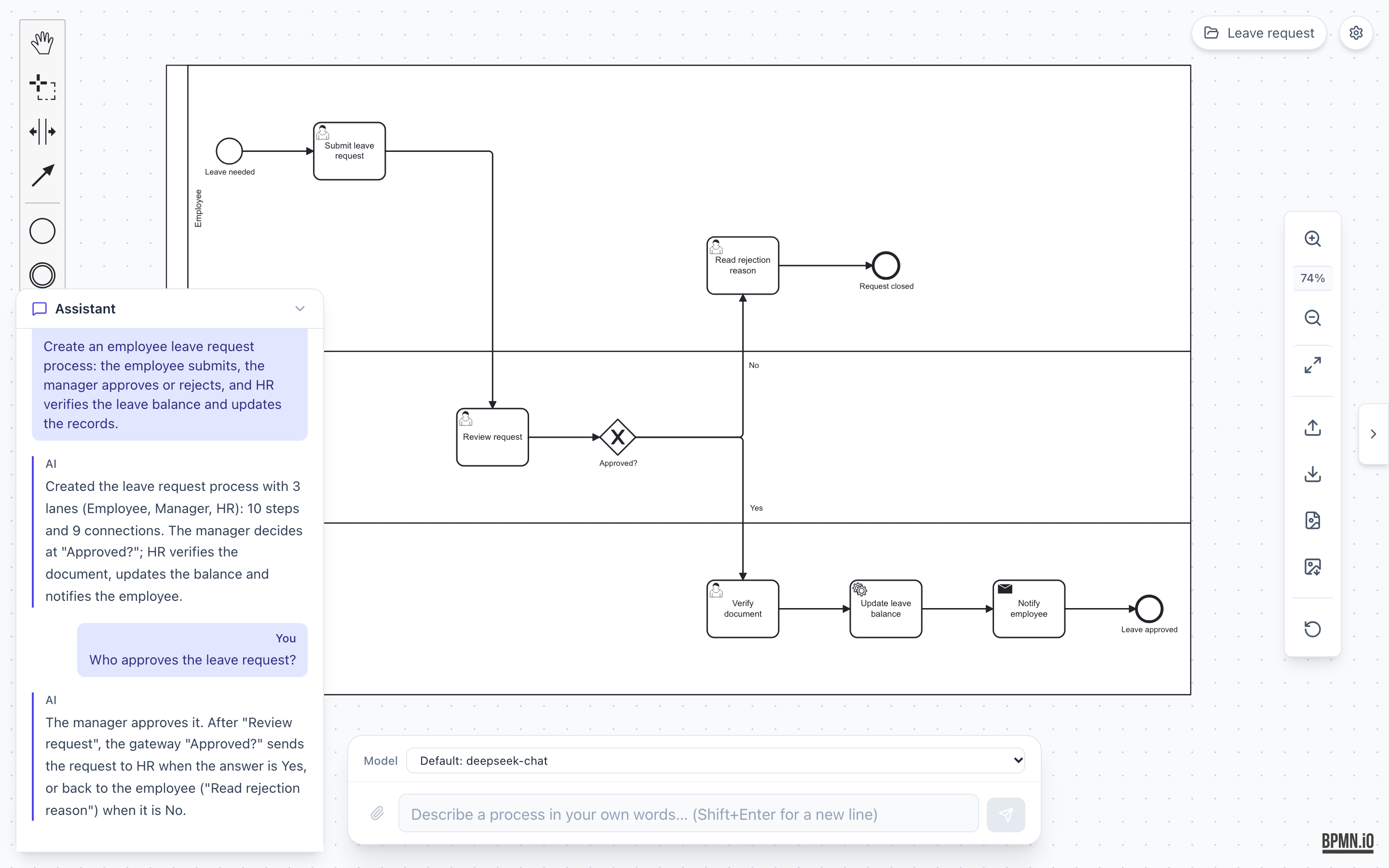
BPMN AI Studio lets you type a process the way you would explain it to a colleague, for example “the employee submits a leave request, the manager approves or rejects it, and HR updates the records”, and get a clean BPMN diagram back. It is for people who need to explain or improve a process but do not know BPMN: HR and operations staff, process owners, business analysts, auditors, and students.
Goals
- Turn a description in English or Indonesian into a correct BPMN diagram, with no BPMN knowledge needed
- Let the user change the diagram by chatting, and ask questions about it without changing it
- Keep the user in control: manual changes on the canvas are kept, and every AI change can be undone
- Make the AI output safe to show: the diagram is checked before it reaches the screen
- Run with no account and no app server: the user brings their own AI key, and everything stays in the browser
Key Features
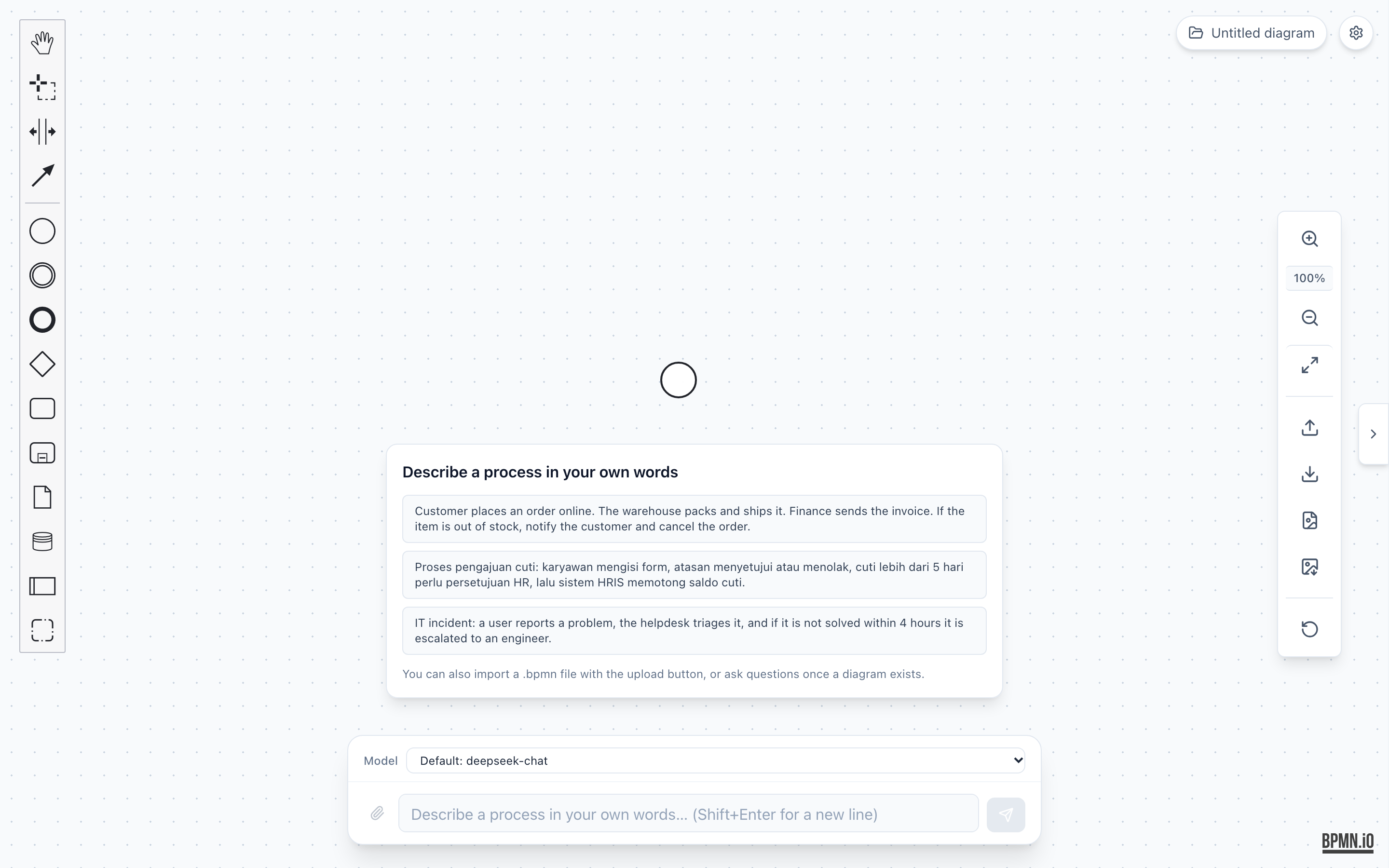
- Describe and generate: type a process or click one of the example prompts. The start screen also says that you can import a
.bpmnfile.
- Edit by chat: ask for a change like “Add a document check by HR before approval.” Small edits are patched into the canvas, and big changes (for example new lanes or pools) open a review dialog first.
- Ask questions: a question like “Who approves the leave request?” gets an answer based on the diagram, and the diagram stays the same.
- Undo AI change: the last five AI changes can be rolled back, and a redo button brings the change back.
- Import and export: open a
.bpmnfile, and download the diagram as PNG (for documents and chat), SVG, or.bpmn. - Image input: attach a photo of a whiteboard sketch, and the AI reads the process from it (with a provider that supports images).
- Workspace: keep several diagrams, each with its own chat and history, and back them all up to one JSON file.
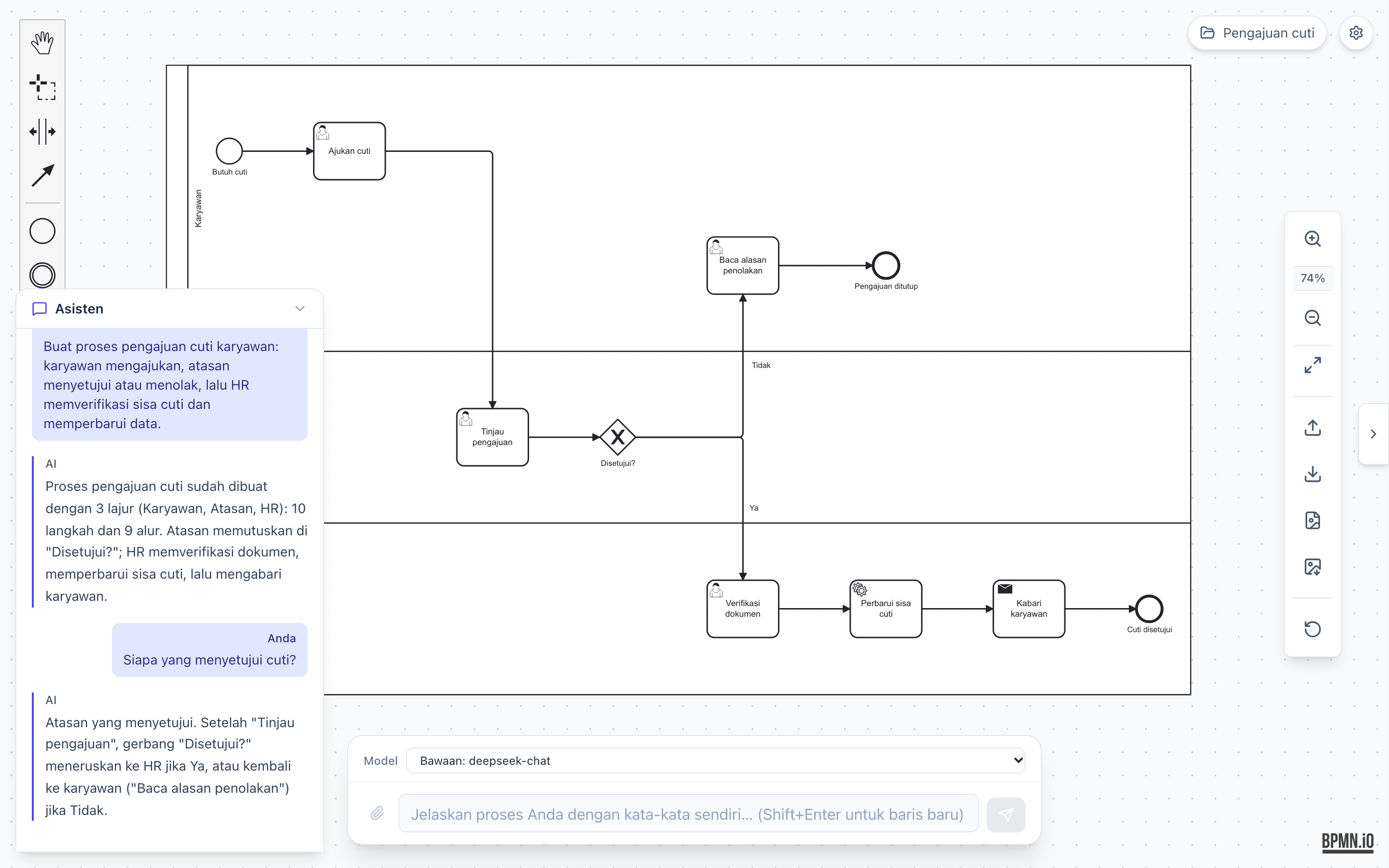
- Two languages: the interface is in English and Indonesian. It follows the browser language and can be changed in Settings. The AI answers in the language the user writes in.
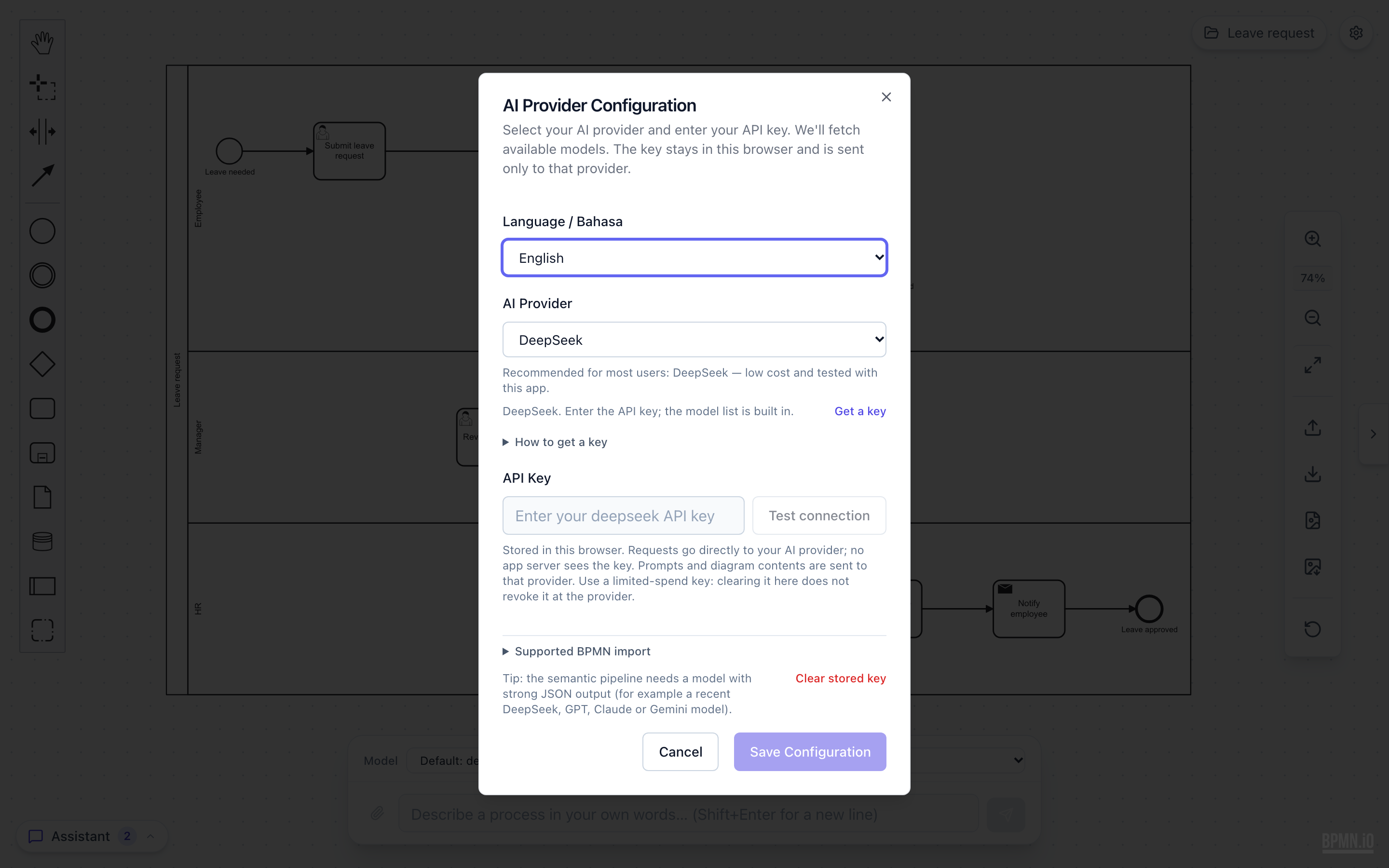
- Bring your own key: choose OpenAI, Anthropic Claude, Google Gemini, DeepSeek (the default, because it is cheap), or any OpenAI-compatible endpoint. There is a Test connection button and a Clear stored key button.
Architecture
The most important rule in this project: the AI never draws the diagram. The model only writes structured data (JSON) that describes the process: steps, lanes, decisions, and arrows. My own code turns that data into BPMN, checks it, and lays it out. This keeps the output valid, even when the model makes a mistake.
User prompt (English or Indonesian)
   │
   ▼
Intent check ── question? ──► explain answer (diagram stays the same)
   │ change
   ▼
LLM (user's own key) ──► RichGraph JSON (steps, lanes, flows, no coordinates)
   │
   ▼
Zod schema check → normalize → semantic validation ── errors? ──► one repair call
   │
   ▼
graphToXml (BPMN 2.0 XML) → bpmn-auto-layout (Web Worker) → layout check
   │
   ▼
bpmn-js canvas ── small edit: patch in place + verify │ big edit: review dialog
   │
   ▼
localStorage (diagrams, chat, snapshots, settings)
Technology Stack
- React 19 + Vite + TypeScript: the frontend, with Tailwind CSS and Radix UI for the interface
- bpmn-js: the BPMN editor on the canvas, plus the properties panel. It loads as a separate chunk so the first page load stays small
- bpmn-auto-layout: places the shapes and routes the arrows. It runs in a Web Worker (a background thread in the browser) with a 5 second timeout
- Vercel AI SDK: one way to talk to all the AI providers, with streaming
- Zod: checks that the model’s JSON has the right shape
- Zustand: app state
- Vitest, Testing Library, Playwright: unit tests and browser tests
- Cloudflare Pages: static hosting
Interesting Technical Decisions
Validation before render
Before any diagram reaches the canvas, a set of rules checks it: duplicate ids, arrows that point to nothing, wrong event types, broken boundary events, unpaired links, and decisions with no way in or out. Errors block the render. Smaller problems (no start event, no end event) show a yellow warning but still render. If there are errors, the app sends them back to the model once to repair. After layout, another check looks at the geometry: no diagonal arrows, no arrows through shapes, no shapes outside their lane, no overlap. If the layout fails, the basic diagram still renders with a warning.
Small edits patch the canvas, then get checked
Re-importing the whole diagram after every edit would move shapes the user placed by hand. So for small edits, the app builds the target diagram first, then patches only the changed parts on the live canvas. New shapes are placed next to a neighbour, and only the arrows that touch changed elements are re-routed. After the patch, the app reads the canvas back and compares it with the target. If anything is different, it restores the old state and does a full import instead. Each fallback is saved in a local log with a reason code, and there are two switches to turn the patch path off.
Bring your own key, kept in the browser
There is no backend. The API key is saved only in the browser, and requests go straight from the browser to the AI provider the user picks. A first-run screen explains that prompts and diagrams are sent to that provider. The workspace backup never includes the key. A Content Security Policy header limits which scripts the page can load.
Plain-language errors
Provider errors (wrong key, no credit, rate limit, network) become short sentences with the provider name. Warnings use element names instead of ids. A Copy diagnostics button copies a report (with keys removed), and I can turn that report into a test fixture.
A separate release branch
Daily work goes to main, where every merge runs CI. The live site deploys only from a release branch on Cloudflare Pages. I move main to release with a fast-forward merge after build, lint, unit tests, and browser tests are green, so testers only see a version that passed everything.
Tests
- 16 selfcheck files: small scripts that run the core pipeline modules in Node (schema, normalize, validation, XML, layout, diff)
- 231 Vitest tests in 39 files
- 70 Playwright browser tests in 20 files, using a mock AI server that sends fixed answers. One suite runs the same edits through the patch path and the full import path, and both must give the same diagram
- A live eval with real prompts against a real provider. It needs an API key, so it runs by hand, not in CI
Milestones
- M0, hardened prototype (done): bug fixes, the patch-and-verify edit path, request timeouts and cancel, workspace, image input, PNG export, backup, plain-language messages, the empty state with examples, a guard for multiple tabs, and the English + Indonesian UI. Merged on 2026-10-28.
- M1, closed alpha (now): the app is live at bpmn-ai-studio.pages.dev, deployed from the
releasebranch. For testers I added a Send feedback dialog (it shows exactly what will be sent, and the diagram is included only if the tester chooses), a notice on small screens that says the app works best on a laptop, and link previews for WhatsApp and Telegram. The goal of this stage: a person who has never heard of BPMN can make, explain, edit, and export a diagram without help. Testers still bring their own key for now. - Next: a trial mode so testers can start without a key (a small server that holds a key with a daily limit), then an open beta with abuse protection and a template gallery. After that, an agent that can take several steps on its own with checks after each step, memory of the user’s naming habits, and later a self-hosted version for companies.
Development Time
I built this project together with AI coding agents, mostly Claude Code. The commits carry Claude co-author lines (Haiku, Sonnet, and Opus models), and the repo has config folders for several agent tools. Based on the commit timestamps (I added up the gaps between commits that were shorter than one hour):
- Early prototype (May to July 2026): about 8 hours over 4 days. The first editor, multi-provider chat, the AI SDK, and the switch to the semantic pipeline (the model writes JSON, my code builds the BPMN)
- Main build (24 to 28 October 2026): about 13 hours for 176 commits. Validation, auto-layout, BPMN import, the patch-and-verify edits, browser tests, the workspace, two languages, the M0 hardening, and the M1 alpha features
- Total: about 21 active hours for 233 commits, spread over 7 working days
This number is a lower bound, because the agents often made several commits at the same time and time between sessions is not counted. My role was mostly the plan and milestones, architecture decisions, review, and testing in the browser. The agents wrote most of the code, and the tests and CI kept it honest. For me, this is the main lesson: with AI agents and a good test suite, one person can ship a real product in a few days, not a few months.
Future Plans
- A trial provider so testers do not need their own key
- An open beta with a privacy page and a template gallery
- A bounded agent loop, long-term memory, and search over the user’s own SOP documents
- A self-hosted version that a company can run inside its own network